Dumping Variables
Every debugger is familiar with the var_dump function, which prints detailed information
about a variable. Unfortunately, its output lacks HTML formatting and merges into a single line, not to mention HTML escaping
issues. In practice, it's necessary to replace var_dump with a more convenient function. That function is
dump().
$arr = [10, 20.2, true, null, 'hello'];

dump($arr);
// or Debugger::dump($arr);
generates the output:
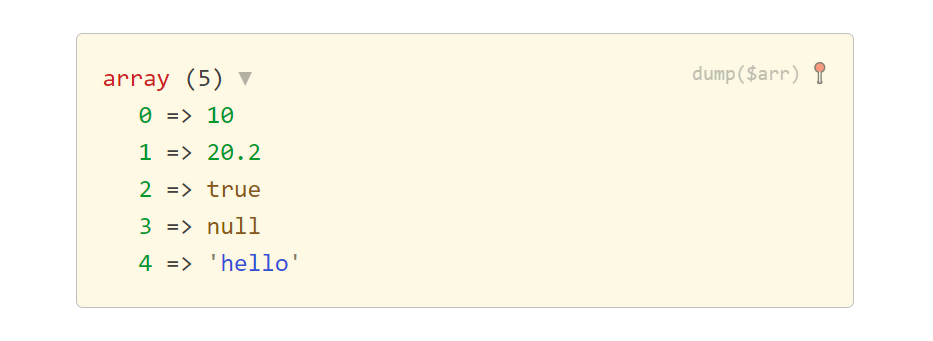
You can change the default light theme to dark:
Debugger::$dumpTheme = 'dark';
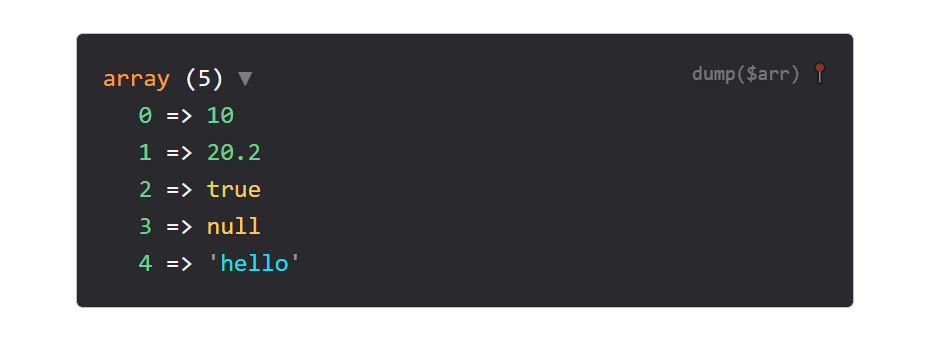
You can also change the nesting depth using Debugger::$maxDepth, the length of displayed strings using Debugger::$maxLength, and the number of array or object items shown using Debugger::$maxItems. Naturally, lower values speed up rendering.
Debugger::$maxDepth = 2; // default: 15
Debugger::$maxLength = 50; // default: 150
Debugger::$maxItems = 50; // default: 100
The dump() function can also display the location where it was called and, for objects, the path to the file where
their class is defined. This is controlled by the Debugger::$showLocation property:
Debugger::$showLocation = true; // displays the location information
Debugger::$showLocation = false; // hides it
For finer control, call Tracy\Dumper::dump() directly and pass the Dumper::LOCATION option set to
Dumper::LOCATION_CLASS (only where classes are defined) or Dumper::LOCATION_SOURCE (also where
dump() was called).
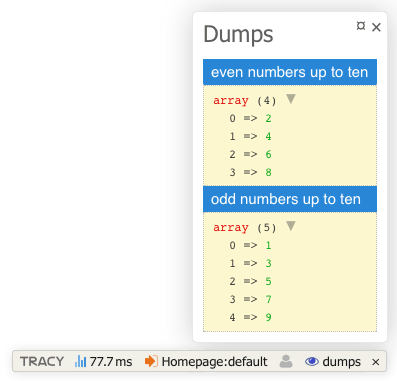
Practical alternatives to dump() are dumpe() (dump & exit) and bdump(). The latter
allows us to dump variable values in the Tracy Bar panel. This is very convenient, as the dumps are separate from the page layout,
and we can also add a title to them.
bdump([2, 4, 6, 8], 'even numbers up to ten');
bdump([1, 3, 5, 7, 9], 'odd numbers up to ten');
Using Tracy\Dumper Directly
Behind dump() stands the Tracy\Dumper class, which you can also use directly. Unlike
dump(), it does not rely on Debugger and takes all its settings from an options array, which makes it
handy for standalone scripts, CLI tools, or whenever you need the dump as a string. Because the settings come from the array and
not from Debugger, the defaults differ slightly: the depth is 7 instead of 15, for
example.
The methods return the dump as a string:
use Tracy\Dumper;

$html = Dumper::toHtml($var, [Dumper::DEPTH => 3]);  // HTML for the browser
$text = Dumper::toText($var);                         // plain text, e.g. for a log
$ansi = Dumper::toTerminal($var);                     // text with ANSI colors for the terminal
Or print the variable straight away with Dumper::dump(), which picks HTML or terminal output automatically
according to the environment:
Dumper::dump($var, [Dumper::DEPTH => 3]);
The HTML output needs a small stylesheet and script. When you dump outside a Tracy-enabled application (i.e.
without Debugger::enable()), print them once in the page head using Dumper::renderAssets().
Dumper::dump() does this on its own, but toHtml() does not.
Options
The output is controlled by an options array passed to all of the methods above:
| Option | Description | Default |
|---|---|---|
Dumper::DEPTH |
maximum nesting depth | 7 |
Dumper::TRUNCATE |
maximum length of strings | 150 |
Dumper::ITEMS |
maximum number of items shown in an array/object | 100 |
Dumper::COLLAPSE |
collapse the top node? true/false, or collapse it once it has at least this many items |
14 |
Dumper::COLLAPSE_COUNT |
collapse a nested node once it has at least this many items | 7 |
Dumper::LOCATION |
show the location; true/false, or Dumper::LOCATION_CLASS (only where classes are
defined) or Dumper::LOCATION_SOURCE (also the call site) |
off |
Dumper::THEME |
color theme, light or dark |
light |
Dumper::HASH |
show object IDs (the # marker) and references (the & marker)? |
true |
Dumper::DEBUGINFO |
use the object's magic method __debugInfo()? |
false |
Dumper::KEYS_TO_HIDE |
array of key names whose values are hidden as ***** |
[] |
Dumper::SCRUBBER |
callback fn(string $key, mixed $value, ?string $class): bool returning true for
sensitive values |
none |
Dumper::OBJECT_EXPORTERS |
custom rendering of objects, see below | [] |
The COLLAPSE, COLLAPSE_COUNT and THEME options apply only to the interactive HTML
output.
The SCRUBBER option hides sensitive values from the dump; see Custom Scrubber for a complete example.
For example, to get a compact dump without object hashes:
echo Dumper::toText($var, [Dumper::HASH => false]);
The ANSI colors used by toTerminal() can be customized via Dumper::$terminalColors.
Custom Object Rendering
By default, the dumper renders an object by listing its properties. Sometimes that is not the most helpful view – a
PhpToken, for example, shows its type as a numeric ID instead of a readable name. You can teach the dumper how to
render a particular class by registering an exporter in Dumper::$objectExporters:
use Tracy\Dumper;

Dumper::$objectExporters[PhpToken::class] = function (PhpToken $token, Dumper\Value $value): void {
	$value->value = $token->getTokenName() . ' ' . $token->text;
};
The exporter receives the object and a Tracy\Dumper\Value object describing how it will be shown. Assigning to
$value->value replaces the header (by default the class name) with your own text, so instead of a list of
properties you get a compact, readable label. The setting applies to every dump of that class, even to objects nested inside
arrays or other objects. Alternatively, you can pass exporters for a single call only via the
Dumper::OBJECT_EXPORTERS option of Tracy\Dumper::dump().
